
Showing posts with label Android. Show all posts
Showing posts with label Android. Show all posts
Top Ten Android Applications That You Must Try At Once
Android is the most used and favorite smartphone operating
system due to the availability of variety of options to choose from the
smartphone market. The applications in android are used to fulfill your tasks
in quick time and in easy way. There are different type of applications
available in the play store from which you can download any app and can install
it for usage. In this article, I will discuss top ten android applications
which you must try at least once.

Must Top
Ten Android Applications For Smartphones
There are the following top ten android applications
available in the play store which you must have to try at once if you are using
android operating system.
1. WeTransfer
The first android smartphone application in our list is WeTransfer. This
application can be used to transfer or send large files through the use of
internet. This application will allow you to pause and resume your uploading of
files. You can also send number of pictures to your friends group or to someone
directly which is in your address book of the phone.
2.
Rove
Rove is originally an iOS application which is now available for the
android users too. This application behaves like a private journal which will
automatically update your logs with details like how you got there and how many
pictures you have taken there.
3.
Blinkist
This application is a perfect choice for any book lover. This is a
subscription service through which you can read many non-fiction titles in just
15 minutes. Every month, they added forty new titles in it.
4.
Ooloo
When we need to know anything we Google it, but this app can be used as a
replacement to Google which will provide you 24/7 answers to your questions.
The important and interesting feature of this app is that your answers will be
replied by human staff instead of machines.
5.
Bound It
This application will give you control over your pictures and you can
select which images you want your friends and family to see and what not to
see.
6.
After Light
If you are a photo lover and want to manipulate your pictures, then you
can use this application which is another app which was firstly in iOS but now
available in android. You can adjust the brightness, saturation, sharpening and
contrast of your images along with different filters.
7.
MIX
Yet another great photo-editing application which can be used by
photographers to create their very own styled pictures with unique styles.
8.
Spin Me
This application is best for you if you want to get up in the morning on
time. This application will only switch off when you will get out of the bed
due to the use of motion-sensor gyroscope.
9.
Swing
Copters
This game is the creation of famous author Dong. Dong become popular
after the creation of his amazing game Flappy Bird. The main purpose of the
game is to navigate the helicopter in the area meanwhile avoiding the hammers.
10. YoWindow
By the use of this amazing application, you can check the current
weather condition in your country or city.
Top 5 Android games with touch screen control

As smartphones and tablets
become more and more powerful, additional game developer’s area unit taking the
time to port their titles over to the platform or area unit building new ones
entirely from scratch. Sadly, several of them shoehorn virtual controls into
the corners of your screen and hope you don’t understand that they’re not
physical buttons.
This simply isn’t ideal. The
simplest mobile games have accepted that touch screens aren’t a similar as Gamepads
and utilize them otherwise.
Here are 5 Android and iOS games
that actually show, however this is often done.
Republique ($2.99)
République may well be a console game. And no, I don’t mean it may realize success as AN indie title, distributed as an inexpensive transfer. It’s the type of expertise that a publisher may slap onto a disk, wrap in a very box, and sell at a high worth with comparatively few changes.
The issue is, this expertise has touch screen written everywhere it. During this concealment game, players guide a lady named Hope around by sound on varied locations for her to cover behind. They watch her from the security of varied security cameras, that they will switch between with, again, straightforward faucets.
This formula permits the developers to form a deep setting while not wrestling with the challenge of giving players full management over what they see.
Leo’s fortune ($ 4.99)
Leo’s Fortune could be a
side-scrolling plat former, a genre that's by no means under-represented within
the Play Store, however, these forms of games will still be notably frustrating
to play with a touch screen. On several plat formers, basic jumps are tough to
land, and later levels typically feel downright not possible while not pairing
up a Bluetooth controller that you just might or might not have.
This isn’t the case with Leo’s
Fortune.
This game’s developers have
custom-made the expertise in a very means wherever the shortage of tactile
buttons now not appears like a disadvantage. Moving consists of holding down one-place
on the screen and slightly moving your thumb left or right.
To jump, players merely swipe
abreast of the proper fringe of the screen. Leo floats ever softly as he moves,
due to gravity and physics that may feel slow with a gamepad however excellent
for a touch screen.
Monument Valley ($ 3.99)
It would be straightforward to populate this list with genres that naturally feel reception on touch screen devices, like tower defence games, puzzles, and point-and-click journey titles. Monument Valley is that the just one I’m together with that falls somewhere on this spectrum.
And there’s an honest reason for this. This game is nothing wanting a piece of art.
During Monument Valley, each stage could be a puzzle. The setting is AN optical phenomenon, and each level tasks you with neutering the landscape to form a path to the exit. You are doing this by swiping on the screen, twisting a bridge around here or raising a platform there. The game play never ramps up to become way more than this, every level introduces new mechanics that keep it slow on this journey feeling contemporary till the terribly finish.
While the expertise is also a brief one, Monument Valley is like an expert crafted title that shows simply what quantity of a distinction nice atmosphere and presentation will build. Nearly each moment of this game is gorgeous enough to print out, frame, and droop on the wall.
Horn ($6.99)
Horn could be a third-person
action-adventure game; however, it doesn’t play like those you usually see on
consoles. This is often a game controlled entirely by gestures. Players move
throughout the planet with sound within the right direction. They polish off
monsters by swiping within the correct means at the proper time, instructing
the hero to dodge attacks and strike employing a blade or bow.
Yet even with such apparently
basic controls, there’s still quite a little bit of plot forming and exploration.
Players run, jump, climb, and swing across areas all victimization gestures
that simply add up.
Horn’s controls might do the
platform justice, however, its presentation takes things a step any. This is
often a stunning, charming-voiced, and nicely scored expertise that encourages
folks to take a seat back with a pill and immerse themselves in a very means
they’re conditioned to solely expect from televisions.
The horn has been around for
over some of years, creating it the oldest game on this list. However, within
the time since, few have tried to match its level of grandeur. Consecutive
title, though, is one that has.
Reaper (Free)
Plenty of role-playing games have created their far more than to Android. Several developers have even created mobile entries from scratch, typically victimization the chance to copy the pixilated look of the 16-bit era. Some are after to travel even additional retro.
But these games all cause AN expertise that, whereas not essentially unhealthy on a mobile device, feels somewhat lacking while not a physical controller. With Reaper, players undergo no such feelings. Kind of like Leo’s Fortune, players move left or right by moving their thumb in both directions, and that they jump by swiping at the sting.
But Reaper takes the game play any. There are dash attacks, serious slashes, and ground thrusts that everyone needs totally different inputs nevertheless aren’t control back by bit controls. If something, the touch screen makes them easier to tug off.
While Reaper could be a side-scrolled, it’s packed with lots of quests and its own world to explore. An oversized varies of customization choices are a unit on the market to the player, leading to AN expertise containing additional depth than at first meets the attention.
So, if you have any other wonderful full touchscreen Android game, then share with us.
Is your Smartphone or tablet getting the Android 5.0 update

Google declared Android 5.0
Lollipop on October 15. It's the following important upgrade for Android that's
designed to start in the coming weeks.
It comes with a brand new Material Layout
user interface which can be described as a purified Google Now interface with
components falling into each other and on top.The operating system features buttons and new cartoons, and new tellings too.
You locate additional information regarding Android 5.0 Lollipop on the official Android site.
There's no central registry you can utilize to learn whether your apparatus will soon be updated. Here's a brief listing of phone versions and firms which are updated. Should you know of others that aren't yet on the list let's know in the comment section below and we'll add those and it .
HTC
Some apparatus upgrades were supported by HTC on Twitter when customers requested about the official channel in it.HTC One (M8 and M7) will be updated, likely other One devices also including One miniature 2 and the One miniature.Motorola announced in the official business site the following devices will get the Android 5.0 upgrade.
Moto E
Droid Ultra, Droid Mini and Droid MaxxSony
The firm printed a blog post to the official Sony Mobile site in which it revealed its plans to update several of its own apparatus to Android 5.0. Upgrades are anticipated to start in early 2015 for Xperia Z2 set and Xperia Z3.Firms who've not released statements
Samsung hasn't published an official statement.LG hasn't supported upgrades. It's anticipated that the update will be received by the LG G3, and probably that other devices including the G2 line will get it.
ZTE hasn't supplied any advice on whether any of its own telephones will soon be upgraded.
How To Reduce Data Consumption In Your Android Smartphone
In today's world, smartphone are becoming vital part of our
lives. They are being used to perform our daily routine tasks like checking
emails of the company etc. They are also used to entertain ourselves by
watching videos on these smartphones. By the use of large screen smartphones,
the web surfing becomes more convenient for the users. The data plans offered
by different cellular companies are limited for users to use.

In this article, I will discuss some ways through which you
can easily reduce the data consumption in your android device so that you can
enjoy stream less and unstoppable 3G and 4G data plan.
· Find Culprit Apps And Make Them Limited
· Find Culprit Apps And Make Them Limited
In android, you can get the benefit of the built-in feature
or tool added in the OS for tracking the data usage of your smartphone. You can
easily find that tool from Settings menu. In Settings Menu, you will see menu
named as Data Usage from which you can have all the stats about your apps usage
of data. You can manipulate settings according to your needs. You can restrict
any application which you think is un-necessary of irrelevant for data usage.
Through this step, you can easily manage the data usage and can restrict the
usage up to some extent.
· Data Compression
· Data Compression
The second way to limit the usage of data in your smartphone
is to reduce your usage in browser. The most used and favorite browser in
android operating system is Google Chrome. There are some settings in Chrome,
which you can tweak in order to limit your data usage. In Settings menu of
Chrome, you can go to Bandwidth Management area. In this menu, you can turn on
Reduce Data Usage option which will be used to compress all the data before
downloading it to your device.
If you dislike Google Chrome browser due to any reason and
want to use Opera Mini, then you can also avail such restricted data usage
option in Opera Mini too. The default functionality of Opera Mini includes the
compression of data. It is another best browser which is pretty fast and light
weight that can limit your data usage up to some level. Opera Mini can compress
your data up to 90 percent. The statistics of the data usage can be accessed by
going to Help section in Opera Mini.
· Media Compression
· Media Compression
If you don’t use internet only for browsing and love to
download stuff from internet, then in this case you will need any media
compression tools. There are two tools which can be used for this purpose which
are Opera Max and Onavo Extend. After creating VPN connection in any of these
tools, the videos and photos of twitter and Instagram will be compressed.
So, these are some of the best, effective and easy ways to
reduce your data usage in smartphone. If you are a browser instead of
downloader, then you can use Data Compression tools. If you are a downloader
instead of browser, then you can use Media compression tools. If you know any
other effective and easy tips for reducing the data consumption in android
device, then let us know by commenting below.
Micromax Canvas Nitro Review: Full Review
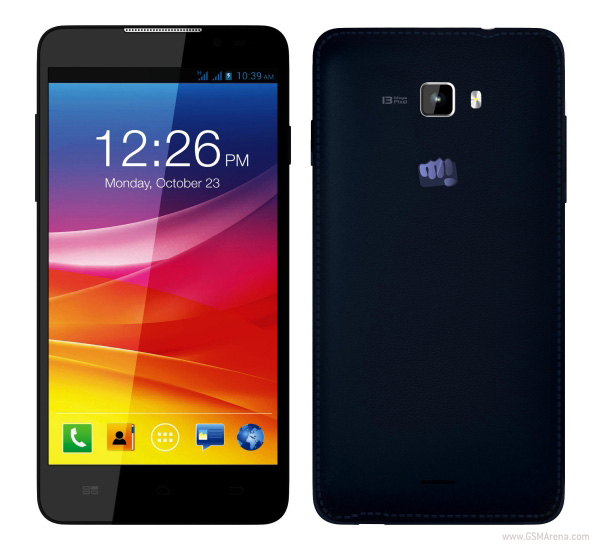
We reviewed the Micromax Canvas Nitro to discover if it can hold its own against heavyweight brands including Motorola, Asus, Xiaomi as well as the surprise star.
Look and feel
On holding the Micromax
Canvas Nitro, with its weight of 146g our immediate reaction, was that
it felt heavier in relation to the alternatives in this budget. The back
of the Micromax Canvas Nitro seems rather like that of the Samsung
Galaxy Note 3 with its faux stitched-leather finish. The front is
largely uninspiring with the 5-inch display taking up most of the real
estate. Actually , the phone on the whole seems somewhat tepid and does
nothing to catch focus.
This telephone is, in addition, accessible dark blue although we got the white variant for review. The power button sits in the correct border while the left border houses the volume rock. Both physical buttons have almost no journey. A 3.5mm audio jack can be located on the top of the telephone, and the Micro-USB port for data transfer and charging is on the underside. Over the display are the telling LED, a front-facing camera and an earpiece. Micromax has made a decision to go with backlit buttons that were capacitive, but they aren't illuminated equally. The back cover might be taken away readily and under it one can locate a slot for a microSD card, two slots for Micro SIM cards, as well as the battery.
This telephone is, in addition, accessible dark blue although we got the white variant for review. The power button sits in the correct border while the left border houses the volume rock. Both physical buttons have almost no journey. A 3.5mm audio jack can be located on the top of the telephone, and the Micro-USB port for data transfer and charging is on the underside. Over the display are the telling LED, a front-facing camera and an earpiece. Micromax has made a decision to go with backlit buttons that were capacitive, but they aren't illuminated equally. The back cover might be taken away readily and under it one can locate a slot for a microSD card, two slots for Micro SIM cards, as well as the battery.
Specifications and software
Micromax
has fitted the Canvas Nitro with all the octa-core Mediatek MT6592
central processing unit that's clocked at 1.7GHz and has an incorporated
Mali-450 GPU. The Canvas Nitro additionally features 2GB of RAM. Out of
the 8GB of internal storage space, just 5.68GB is accessible for users
but you can enlarge this by up to 32GB using a microSD card.
Two Micro SIM cards are accepted by the telephone and users connect to the 850/ 900/ 1800/ 1900/ 2100 network bands. In addition, it can connect to other Bluetooth and WiFi networks -enabled devices. A 2500mAh battery supplies the juice for the apparatus. The 5-inch 720p screen is very good for the large part with good viewing angles and vivid colours, when seen under direct sun, but things go down. The display is quite reflective and we had a difficult time attempting to use this telephone due to this.
Micromax has tweaked the software to add several added attributes that have been largely borrowed from HTC's Sense UI and Samsung's Touchwiz. Micromax for starters, adds a QuickLook page to the left of the primary homescreen. QuickLook is nothing but Micromax's effort to emulate the BlinkFeed of HTC. The settings where a person can select which subjects the web feed screens are shown by yet another swipe from the QuickLook page. You may also add Twitter and Facebook reports in order they can represent in the feed. Nevertheless, there's no method to add feeds from special sites. Also, there's a strange blue tint to the backdrop of text when any post is opened, which makes it somewhat hard to read.
The lockscreen has a straightforward swipe-up gesture, and notifications that are accessible are shown on a reddish band. A number of the other applications tweaks include the capacity to stop video playback when the user looks away, which is an immediate raise of Samsung's 'Smart Pause' attribute. It works the majority of the time, if ambient lighting is great enough. There are a number of tweaks to the camera software.
There are a ton of third party programs and they're mainly bloatware - programs that are simply useless. The Clean Master program has a widget to the house display and it's very intrusive unless its settings change. In addition, there are programs like M! Games and M! Live which only jump to Web pages. What is worse is that none of these programs can not be install. Swiftkey is the computer keyboard by default option that's very good. Micromax also bundles the Truecaller program that is somewhat annoying. There are a lot of games, all which are trial versions.
Two Micro SIM cards are accepted by the telephone and users connect to the 850/ 900/ 1800/ 1900/ 2100 network bands. In addition, it can connect to other Bluetooth and WiFi networks -enabled devices. A 2500mAh battery supplies the juice for the apparatus. The 5-inch 720p screen is very good for the large part with good viewing angles and vivid colours, when seen under direct sun, but things go down. The display is quite reflective and we had a difficult time attempting to use this telephone due to this.
Micromax has tweaked the software to add several added attributes that have been largely borrowed from HTC's Sense UI and Samsung's Touchwiz. Micromax for starters, adds a QuickLook page to the left of the primary homescreen. QuickLook is nothing but Micromax's effort to emulate the BlinkFeed of HTC. The settings where a person can select which subjects the web feed screens are shown by yet another swipe from the QuickLook page. You may also add Twitter and Facebook reports in order they can represent in the feed. Nevertheless, there's no method to add feeds from special sites. Also, there's a strange blue tint to the backdrop of text when any post is opened, which makes it somewhat hard to read.
The lockscreen has a straightforward swipe-up gesture, and notifications that are accessible are shown on a reddish band. A number of the other applications tweaks include the capacity to stop video playback when the user looks away, which is an immediate raise of Samsung's 'Smart Pause' attribute. It works the majority of the time, if ambient lighting is great enough. There are a number of tweaks to the camera software.
There are a ton of third party programs and they're mainly bloatware - programs that are simply useless. The Clean Master program has a widget to the house display and it's very intrusive unless its settings change. In addition, there are programs like M! Games and M! Live which only jump to Web pages. What is worse is that none of these programs can not be install. Swiftkey is the computer keyboard by default option that's very good. Micromax also bundles the Truecaller program that is somewhat annoying. There are a lot of games, all which are trial versions.
Camera
The 13-megapixel
camera on the Micromax Canvas Nitro is an ideal example of the megapixel
count does not matter. Detector and the lens of the cellphone certainly
do not do it any justice. As a result when seen at real size, it's
quite clear that got pictures lack a great deal of details. You can
observe a blue tint to pictures, if seen carefully. In low light, the
camera did not get any detail. The sole upside is the fact that the
camera can focus and shoot pictures extremely quickly.
Recorded video is recorded in .3gpp format for some reason as well as the quality is very poor. The camera could not remain focused on any subject, and video was only quite dim. Astonishingly, the set- focus -megapixel front camera can get pictures that are adequate but it is as bad as the one on the Sony Xperia C3 Dual. Micromax has added one of the house displays, which right lets a user get a number of the camera's many modes and a camera widget. The selfie mode is self explanatory. Frontback way reveals them in schisms creen and takes pictures with both cameras. We believe that Micromax could have stuck to the tried and don't know the novelty of the mode -and-examined picture in picture format used by other smartphone businesses. That is a Secure way in which a reading like a heart rate monitor goes in addition to the display when the apparatus is secure enough for shooting to reveal you. The camera program by itself supplies plenty of great choices like saying the word 'cheese' to get an image (which did not work most of the time). Additionally, there are a couple of manual controls too. But concealing frequently-used modes like HDR in the settings menu is quite annoying.
Recorded video is recorded in .3gpp format for some reason as well as the quality is very poor. The camera could not remain focused on any subject, and video was only quite dim. Astonishingly, the set- focus -megapixel front camera can get pictures that are adequate but it is as bad as the one on the Sony Xperia C3 Dual. Micromax has added one of the house displays, which right lets a user get a number of the camera's many modes and a camera widget. The selfie mode is self explanatory. Frontback way reveals them in schisms creen and takes pictures with both cameras. We believe that Micromax could have stuck to the tried and don't know the novelty of the mode -and-examined picture in picture format used by other smartphone businesses. That is a Secure way in which a reading like a heart rate monitor goes in addition to the display when the apparatus is secure enough for shooting to reveal you. The camera program by itself supplies plenty of great choices like saying the word 'cheese' to get an image (which did not work most of the time). Additionally, there are a couple of manual controls too. But concealing frequently-used modes like HDR in the settings menu is quite annoying.
Performance
We did not confront any hiccups while
using the Micromax Canvas Nitro every day. It functions fairly nicely
and has simple transitions. It's an excellent smartphone encounter. We
even attempted high end games like Dead Trigger 2 and Asphalt 8, and we
did not confront any slowdown whatsoever.
The standard amounts are second only to the somewhat more pricey Xiaomi Mi 3 in this budget. In AnTuTu and Quadrant standards the cellphone was able to score 28,302 and 13,444 respectively, which are more than good amounts. The phone also hit 13.4fps and scored 6,453 in our GFXbench and 3D Mark Ice Storm images evaluations. The Canvas Nitro played all the greatly encoded videos we threw at it with no hassles. The loudspeaker is overly soft and also it distorts at high volumes. The function will be served by the bundled earphones for most of us, which is a great thing. The call quality is very nice as well as the sound on both ends of the call was crystal clear.
We were totally floored in the Canvas Nitro's battery operation. It managed to play with video in a loop for 9 minutes and 16 hours before it expired on us. This really is special battery life and this one operation stat is sufficient to sway plenty of buyers in the phone's favour.
The standard amounts are second only to the somewhat more pricey Xiaomi Mi 3 in this budget. In AnTuTu and Quadrant standards the cellphone was able to score 28,302 and 13,444 respectively, which are more than good amounts. The phone also hit 13.4fps and scored 6,453 in our GFXbench and 3D Mark Ice Storm images evaluations. The Canvas Nitro played all the greatly encoded videos we threw at it with no hassles. The loudspeaker is overly soft and also it distorts at high volumes. The function will be served by the bundled earphones for most of us, which is a great thing. The call quality is very nice as well as the sound on both ends of the call was crystal clear.
We were totally floored in the Canvas Nitro's battery operation. It managed to play with video in a loop for 9 minutes and 16 hours before it expired on us. This really is special battery life and this one operation stat is sufficient to sway plenty of buyers in the phone's favour.
Verdict
The Micromax Canvas Nitro does
lots of things one would anticipate from a smartphone and does the
nicely for the large part (other than for the camera). It's priced at
Rs. 12,900, which is an excellent deal. Sadly for Micromax, the
marketplace is full of a slew of choices in this variety as well as the
updated Moto G is tremendous rivalry for the cellphone. The influence
that Canvas Nitro has over most of the other mobiles such as the Asus
Zenphone 5, Xiaomi Mi 3 (out of stock for now) and the Moto G (Gen 2) is
it will soon be obtainable in retail stations as well apart from any
one online store. We'd advise this phone to anybody who wants special
battery life, provided that they are willing to take the bad camera as a
tradeoff.
Xiaomi Redmi 1S vs Motorola Moto E – Comparison

It's rightly stated the smartphone becomes the lifeline of human being this apparatus is in range of every budget guy. The nation like India is the principal location at which you are going to fine people who have moderate and this characteristic of India and low budget becomes the motive of the enormous success of Global smartphone Businesses. In last few year lots of cellular manufacturers round the glob has done a great company in India and the smartphone firms like Motorola, Xiaomi are playing the crucial success function in India Micromax with home ground cellular telephone maker. So take a look on this particular comparison of Motorola Moto E. and Xiaomi Redmi 1S
Online Availability
The Moto e on the well-known online store Flipkart for Rs. 6999, Moto E's meaning buyer can purchase it.
Screen and Layout
There's not too much difference between the screen size of both smartphone, Redmi 1s packaged with a 4.7 inch high definition screen and Moto E with a 4,3 inch qhd screen. If we discuss the resolution and pixel density than Redmi 1s has pixel density and better resolution than Redmi 1s. But the Moto E screen quality is lasting and crispy. Corning Gorilla Glass protection protects both smartphones display to save the display from damage and scratches.
OS and Central Processing Unit
Here Redmi 1s is additionally supply functionality that is better than Moto E. The excellent browsing experience, better graphics operation is offered by the Redmi 1S.
Xiaomi Redmi 1S runs in the Android 4.3 Jelly Bean OS while the Moto E packaged with the more complex Android 4.4 KitKat OS. In The Moto E users will able to have more Android programs via google play shop.
Camera Storage
the Redmi 1s can record FHD 1080p video. In the other hand the Moto E only have a 5 Mp primary camera, there's no camera that is front exist in Moto E.
Xiaomi Redmi 1S comes with 8 GB of internal memory that is expandable upto 32 Gb via Moto E and Micro SD card has a 4 GB inbuilt storage with same memory that is expandable.
Battery and Connectivity
In the battery section both the smartphone are fairly similar, with a couple difference. Xiaomi Redmi 1s powered by the Moto E houses a 1,980 mAh battery and a 2,000 mAh battery. Both the smartphone battery are good enough to deliver an adequate back-up bot long life.
Connectivity characteristics of both apparatus are similar both USB support 3g, wi fi, buetooth,. So the users may enjoy amusement attributes and great web connectivity.
Cost
The cost of both smartphones are alike, both are priced at Rs. 6,999. Now it depend on you which one suited to your wants, both apparatus are excellent in the like Resmi 1s offers better functionality and camera characteristics than Moto E. Onthe other hand Moto E provide great quality clear and crispy screen.
Xiaomi Redmi 1S vs Motorola Moto E – Which One to chose
XIAOMI REDMI 1S
|
MOTO E
| |
|---|---|---|
| Display | 4.7 inch, HD | 4.3 inch, qHD |
| Resolution | 1280×720 pixels | 960×540 pixels |
| Camera | 8 MP Rear / 1.6 MP Front | 5 MP rear |
| Processor | 1.6 GHz quad-core Cortex A7 processor | 1.2 GHz dual-core Qualcomm Snapdragon |
| OS | Android 4.3 Jelly Bean | Android 4.4 KitKat |
| Storage | 8 GB, Expandable up to 32 GB | 4 GB, Expandable up to 32 GB |
| Battery | 2,000 mAh | 1,980 mAh |
| RAM | 1 GB | 1 GB |
| Connectivity | Wi-Fi, GPS, Bluetooth, Wi-Fi Direct | Wi-Fi, GPS, Bluetooth, Wi-Fi Direct |
| Price | Rs 6,999 | Rs 6,999 |
5 Best Cheap Android Kitkat Phones Under INR 10,000

Android 4.4 KitKat is the 10th leading variant of Android which was established in November 2013 by Google with lots of changes. This new Mobile software is very distinct in look and feel from the old model of Android : Ice Cream Sandwich. This new variant also called by its own nickname changes in Android color scheme, developments in house display which consist Google and Kitkat, which bring lots of added features. This software has designed for user's convenience to supply them a simple and simple user interface by enhancing phone dialer program.
All these smartphone consist in the listing of Top 5 Most affordable Kikat OS powers Android KitKat Smartphone's and priced affordably. We recorded these smartphones not just on the foundations of OS all these mobile phones comes with strong central processing unit, good camera characteristics, good battery life, smart connectivity features and a lot of other excellent attributes.
Android Kitkat Powered Smartphones Below Rs. 10000
So lets check this list of greatest five budget smartphones running the most recent Android variant. 10000, choose at an apparatus that is right from this list.
Motorola Moto E
According to me Motorola Moto E is the greatest smartphone for people who would like a low-cost budget kitkat smartphone that is great brand. Moto E requires record breaking layout and a grand entrance in the marketplace because of the affordable cost and characteristics. Few times past it wasn't accessible online also but you can now get it readily. The Moto E attributes contains a 4.3-inch qHD screen, dual-core processor, Android 4.4 and KitKat, a 5MP back camera, powered by a 1980 mAh battery. But here is a drawback in the apparatus which is dearth of front camera.
Micromax Unite 2 A106
Micromax Unite 2 was found only following the start of Moto E and give a powerful fight to it. The Unite 2 additionally has excellent attributes in a cost that is low-cost, the drawback of Moto E meet because Unite 2 consist front camera, by unite it. 2 attributes are united by the to an exquisite and easy layout that users have favored.
Xolo Q600S
The organization established Xolo Q600S to win against the smartphone like Micromax and Moto e Unite 2. The smartphone was found for Rs. 6,999 but now it's available for Rs. 7, 299. The smartphone has powered by excellent attributes with in a budget cost. the smartphone runs in the Android 4.4 kikat OS, packaged with a 5MP back camera, VGA front camera and powered by 1980 mAh Lithium-ion battery.
Micromax Canvas Engage A091
The Micromax Canvas Engage A091 is another kikkat powered smartphone subsequent to the success of blend 2 was established by business.
Lava Iris X1
Last but not the very least smartphone of our top 5 funds kikat smartphone list is Lava Iris X1. The smartphone reach sales goal that is excellent with its attractive features. It runs on the most up-to-date Android v4.4.2 KitKat Operating System. The double sim smartphone is 3G compatible.
Top 20 Hack codes of Androids /hack codes of Smartphone

1. Phone Information, Usage and Battery – *#*#4636#*#*
2. IMEI Number – *#06#
3. Enter Service Menu On Newer Phones – *#0*#
4. Detailed Camera Information – *#*#34971539#*#*
5. Backup All Media Files – *#*#273282*255*663282*#*#*
6. Wireless LAN Test – *#*#232339#*#*
7. Enable Test Mode for Service – *#*#197328640#*#*
8. Back-light Test – *#*#0842#*#*
9. Test the Touchscreen – *#*#2664#*#*
10. Vibration Test – *#*#0842#*#*
11. FTA Software Version – *#*#1111#*#*
12. Complete Software and Hardware Info – *#12580*369#
13. Diagnostic Configuration – *#9090#
14. USB Logging Control – *#872564#
15. System Dump Mode – *#9900#
16. HSDPA/HSUPA Control Menu – *#301279#
17. View Phone Lock Status – *#7465625#
18. Reset the Data Partition to Factory State – *#*#7780#*#*
19. Format Your Device To Factory State(will delete
everything on your phone) – *2767*3855#
20. Hidden Service Menu For Motorola Droid – ##7764726
Motorola Moto X VS. Motorola Moto G

Motorola has unleashed its latest Android Flagship handset Motorola X which seems to be an elder brother of Motorola G, when it comes to chassis. We are going to demonstrate a precise comparison of both ‘siblings’ to ease up our users to make an apt decision that which handset appositely suits their needs. Question wandering in people minds that keeping into fact Moto X reasonable price, what it would offer to its customers which MOTO couldn’t? What made Motorola think about unveiling another feature handset that ultimately expanded Moto family altogether? Let’s satiate all such intuitions by undergoing a head to head comparison between these two!
Display
Moto X is integrated with Super 4.7’’ AMOLED touch display bearing 720p High Display resolution. On the other hand, Moto G loosened some numbers owing to its relatively short but exorbitant 4.5’’ LCD Display which makes videos and images amazingly standout. Bear in mind, Moto G share same picture resolution as that of its successor i.e. 1280×720 p.
Camera
5 MP high resolution rear camera of Moto G is nonetheless a treat to experience. Video-callers and selfie lovers, Hold your nerves as you would be quite excited to know that this sophisticated grotesque also support 1.2 front camera. BUT Moto G can’t stand its contender’s HD 10 MP camera coupled with 2.1 front facing camera. So without an aura of doubt, we can state that Moto X owing to its premium camera, can render a stunning impact on its possessor because of its spectacular color contrast and image sharpness.
5 MP high resolution rear camera of Moto G is nonetheless a treat to experience. Video-callers and selfie lovers, Hold your nerves as you would be quite excited to know that this sophisticated grotesque also support 1.2 front camera. BUT Moto G can’t stand its contender’s HD 10 MP camera coupled with 2.1 front facing camera. So without an aura of doubt, we can state that Moto X owing to its premium camera, can render a stunning impact on its possessor because of its spectacular color contrast and image sharpness.
Internals (Processor, Ram)
Moto X is engineered with Dual core processor clocked at 1.7 GHz whereas Moto G left no room for its brother to give it some competition, thanks to its 1.2 GHz Quad core Qualcomm 400 processor. So Moto G leads the marathon when it comes to disruption free processing speed. Moto G was originally available with Android 4.2 Jelly Bean but recently it has been updated to KitKat 4.4, thus now both of them possess similar OS and are Neck to Neck in this particular spec.
Moto X is engineered with Dual core processor clocked at 1.7 GHz whereas Moto G left no room for its brother to give it some competition, thanks to its 1.2 GHz Quad core Qualcomm 400 processor. So Moto G leads the marathon when it comes to disruption free processing speed. Moto G was originally available with Android 4.2 Jelly Bean but recently it has been updated to KitKat 4.4, thus now both of them possess similar OS and are Neck to Neck in this particular spec.
External Memory
Moto X is introduced in the market with built-in memory of 16 GB or 32 GB. So now you can store heaps and stacks of data without giving any forethought to the memory storage your data will entail. Whereas Moto G showed up with built-in 8 GB or 16 GB memory with no expandable memory slot. Absence of Micro SD card slot in both gadgets speaks volume about Google intention to steer users towards its Cloud services. In Moto X , incorporated 2 GB of Ram which enables number of applications run side by side whereas Moto G could only come up with 1 GB , thus another pull back!
Market Price
The price tag of SIM-FREE Moto X 16 GB (£ 380) outstripped SIM FREE Moto G of same built in memory (£ 159) but wooden touch in former’s rear casing along with other high end specifications worth the price hike.
Battery
2070 mAh battery in Moto G seems like a joke as its quad core heavy processor won’t let this flagship gadget surpass one day easily , though its Power Management is quite optimum. On the contrast, 2020 mAh battery juice in Dual core Moto X made Motorola’s legend not less than a Megastar.
Final Verdict
When it comes to Moto G vs. Moto X, both gadgets have somehow more or less same specs but we would give Moto X an edge over its counterpart owing to its blazingly high end camera and super large display. High speed processor of Moto G won’t stand low battery fluid of 2070 mAh for a day so consequently, a major drawback which pushed it in secondary position in term of customers’ preferences.
Moto X is introduced in the market with built-in memory of 16 GB or 32 GB. So now you can store heaps and stacks of data without giving any forethought to the memory storage your data will entail. Whereas Moto G showed up with built-in 8 GB or 16 GB memory with no expandable memory slot. Absence of Micro SD card slot in both gadgets speaks volume about Google intention to steer users towards its Cloud services. In Moto X , incorporated 2 GB of Ram which enables number of applications run side by side whereas Moto G could only come up with 1 GB , thus another pull back!
Market Price
The price tag of SIM-FREE Moto X 16 GB (£ 380) outstripped SIM FREE Moto G of same built in memory (£ 159) but wooden touch in former’s rear casing along with other high end specifications worth the price hike.
Battery
2070 mAh battery in Moto G seems like a joke as its quad core heavy processor won’t let this flagship gadget surpass one day easily , though its Power Management is quite optimum. On the contrast, 2020 mAh battery juice in Dual core Moto X made Motorola’s legend not less than a Megastar.
Final Verdict
When it comes to Moto G vs. Moto X, both gadgets have somehow more or less same specs but we would give Moto X an edge over its counterpart owing to its blazingly high end camera and super large display. High speed processor of Moto G won’t stand low battery fluid of 2070 mAh for a day so consequently, a major drawback which pushed it in secondary position in term of customers’ preferences.
Six Amazing Alternatives To Temple Run
 Today’s generation like speedy games. The game temple run is one of the most favorite games of everyone. Its and endless running game with lots of challenges. I have seen many people who use to play this game for many hours. Few of my friends love this game and I have caught them in classroom. But don’t you think that playing same game again and again will decrease the intrest of game among all. I think there must be so alternatives so this game so that we can take the pleasure of speed and fun in different tastes. So in this post we will focus on six best alternatives to Temple Run.
1. Subway Surfers: - This is also an endless running game with lots of speed and challenges. The best thing of this game is that you have to pass various incoming challenges. There are many props which you can use while playing this game. This props are skate board, paint jet, magnets, high jump shoes etc. There are many avatars in these games and for choosing any of them you have to cross few challenges and earn sufficient number of coins or props. In this game you also have to pass weekly and monthly challenges and on its basis you get some reward. You also get some keys and with the help of these keys you can unlock your defeated i.e. if you are defeated then there is an option available for few seconds and with the help of that option and some keys you can return your avatar back in the game. This game is available for Windows phone, iOS and Android platform. You can download this amazing game from here.
2. Streaker Run: - This is another endless running game which aims at testing your reflexes and nerves. In this game you have to run along yards and you can also run on roofs. Sliding, jumping and turning aside obstacles are also fun in this game. This game aims at collecting gems, grabbing Power- upds, winning Bucks and buying Toy Rides for avoiding defeat from big bruiser. Here big bruiser is always hot at your trails. You also have to save your avatar fro Zombie who is in search of brain to fulfill its hunger. To download this game for android you can click here and for iOS devices, click here.
3. Agent Dash: - This game is an explosive running game of Google. In this game your only mission is to kill as much villainous as possible. While doing this you have to pass through amazing environment by taking help your secret avatar skills. You also have to save your avatar from harmful laser beams, falling trees, lava etc. You have permission to use your spy gadget, parachutes etc. But you have to complete this mission is desired time otherwise you will be failed. You can download this game for Android and iOS.
4. One Epic Knight: - Are you searching a game that always leaves you feeling EPIC? If yes then your search is over now, as with this endless running game you are going to enjoy a lot. You have to go in endless dungeon crazy traps, creatures and chasms. You have to do all these things in pursuit of almighty loot. This game is also available for iOS and android.
5. Vector: - This arcade style game is amazing. It’s a free running game. This game begins with a view of totalitarian world and in this world freedom is not more than a distant dream. But the heart of your avatar is very strong and soon you will break free in this game. Vault, slide, climb and run are amazing techniques used in this game. But you have to practice a lot to gain perfection. Download this game for Android and iOS platforms.
6. Despicable Me: - Various characters like Minions, Gibberish, yellow and Gru’s loyal are ready to face the toughest challenge of this game. This game is completely based on speed and presence of mind. So first you have to impress your boss in this game and then you have to explore your different skills. You can play this game on Android and iOS.
"Native Mobile Apps Vs HTML5 Mobile Apps" Which one should you go for?

Amidst this fierce competition, there’s still one important aspect separating different businesses in the segment: knowing which platform to be used for developing mobile applications. Here today we aim to provide you better guidelines for developing mobile applications within your organization by comparing the two most serious contenders for mobile apps development platform, i.e. HTML5 and native application development platform.
Let’s have a look at what’s best for your organization and in which technology should you invest in order to maximize the Return on Investment (ROI), customer outreach and the worth of your developed application.
Native applications are developed only for a single mobile-based OS such as Android or the Apple iOS, and are distributed using proprietary app stores.
Quite the reverse, Web-based mobile applications written in HTML5 exist online. Such apps can be easily downloaded and used for mobiles or tablets based on almost any operating system.
Current market trends highlight a strong inclination towards the use of native apps as they are, still, the favorite among consumers across the globe. HTML5 seems to be losing its way against native apps; however, you must not underestimate the value of mobile apps developed in HTML5. In clear terms, HTML5 is lost but not dead.
Here’re some of the key points that help native apps stand apart from the competition:
Native apps:
- have taken over the bulk of mobile usage
- can ensure maximum revenue generation for the developers
- can be used in places having no network connectivity, example in airplanes
- provide customized, convenient and consistent user experience
- offer easy integration with mobile devices to support applications like camera and GPS
- can be easily synchronized with backend data sources to reduce data costs, specially while roaming
- provide Push Capability for receiving automatic application updates
- offer interactive GUI that allows you to do more with your app
In HTML5 mobile apps:
- users have to log on to the web to update the applications
- developers miss that monetization power provided by Google and Apple app stores
- users do not have a central store or location to download apps
- revenue is generated mainly through advertisement which is not very profitable
- apps have limited access and compatibility with different mobile platforms
HTML5 apps also do have a handful of benefits such as comparatively easier, widely-known programming language and simpler interface as compared to native apps, though these advantages are far too less to make a match of it. And then, against the general feelings of HTML5 lovers who comment that this downfall in mobile Web apps is merely a small-time bump, it seems like the road ahead is not very rosy for HTML5 mobile apps.
However, native apps also face a few hurdles like their development is time consuming, they have to deal with the licensing processes of Google or Apple app stores, they can be developed only for a specific mobile platform, etc. Still, the modern-day consumer is highly fascinated by these apps and the developers get high revenue streams.
To sum it up, native mobile apps are going to go places and you would do well to follow them.
Top 5 Apps For Financial Planning

So, why not we go for some alternate in this age of rapid-fast digitalization where everything depends on technology. Here today, we bring to you a wrap-up of top five smartphone apps that would work wonders for managing personal finance. These apps mainly concentrate on how to manage your budget, make savings and then keep a record of every penny you spend. These apps have their own pros and cons, and so it’s rather tough to make selection as to which app is the best of the lot. They’re all good, depending upon your use, need and expectations. Check them out now.
1. BillTracker

Not all of your bills are due to be paid on the same day, or are they? Not really, that’s what lies on the framework of BillTracker. It’s a tiny app that keeps a toll of all your routine bills and the day they are due to be paid. You just need to input the amount you need to pay for any particular bill, and that’s it. Next, you need to fill in the date due for the submission of the bill. That’s all the information this app needs to schedule a calendar view of your bills for the entire month.
As the month progresses, the app will keep a check on all the bills you are deemed to pay for the month. You can check the app at any time to see the current status of your bills payment and to check what all bills you need to pay during the month in progress. Also, you can set a reminder or alert alarm that will remind you of all the bills you must be paying around the current date.
It is, indeed, a wonderful app for you if you are one among those who dread forgetting the payment of bills.
Undue expenses such as overdrawn and late fees not burden your budget and blow a hole in your wallet; but also strain your credit rating unduly.
2. Easy Money

It’s a wonderful app you will hardly ever get to witness in the segment. With a superfine mingle of features and functionalities, it assists you no end in managing your financial status. The application has easy options which you can set so that it can provide you alerts about recurring bills and other financial transactions that you need to handle during a particular month. Also, it can provide you alerts about late payments and overdue bills, that’s indeed something we all wish to remember forever and never miss out on.
It will provide you easy access to a lot of personalized financial assessments and other reports that you can customize by adding various color codes etc. to make them stand apart from others.
Easy Money can also be used as a screen widget, isn’t it something special? It will, then, provide you a detailed summary of your bills, other payments and financial transactions. With the screen widget in place, you are open to add new financial transactions without even running the application. It provides a range of other features which include taking images of your bills, making calculations on a spreadsheet, storing them in CSV format, using the calculations for further analysis, and a lot more.
Though the app looks like a bit on the higher side in terms of the price, you are open to take advantage of a 30-day free trial to check out its various features before going on to buy the full version of the app.
3 Pageonce Personal Finance

The next on our list of top five bestselling financial planning apps is the Pageonce Personal Finance which holds aces in tracking bill payments, bank accounts, investments, credit card transactions, etc. Once programmed to good effect as per your bill dates and other critical information, it offers reminders and other timely alarms for your due dates of bill payments and all.
Though budgeting feature is not available in this application, it’s still worth the price because of its multifaceted features.
Pageonce can easily keep a record of various pay-as-you-go indices like your cell phone minutes and frequent flyer miles, etc. In addition, you can upgrade to the full premium version also that offers various other exciting features such as flight information.
Other than the financial aspects, this app has a bit of non-financial features as well. For instance, you can anytime check your Facebook updates, Netflix queue as well as your eBay account, isn’t it interesting?
There’s also a free account on which you will have to deal with a plentiful of advertisements, make sure you choose a strong enough password for your account on this app.
4. Mint.com

In comes an absolutely free app that will surely make your life a whole lot easier - especially when it comes to managing financial transactions. This app supports both the Android as well the iOS platform and helps you easily transfer data from one to another. It provides you the ease and comfort to add your transactions, manage them, set up notifications for your budget, check your accounts, etc. And all this comes absolutely free, what else can one hope for.
5. Barcode Scanner Shopping

Last but not the least; we have for you an absolutely amazing and super-saving app. When you take your iPhone for the next shopping fiesta, don’t forget to use this tiny app. Just take the image of the bar code and this app will take no time to read it. That’s not all: it will populate a list of places from which you can buy the same stuff for much lesser price. You can see the open hours of each store, compare the prices, and can then decide from which store you should buy the product in order to make maximum benefit. In addition, you can learn more about the product you are interested in.
You can also browse the web for various other details to see whether or not the product was manufactured ethically along the standard business lines.
Exactly the way you use Google shopping, you can use this almost free and faultless app. You can visit the website to see the price of the commodity you are interested in, and it will also show you if the product is available with free shipping. You can explore the entire shopping store at will till the time you are fully satisfied to add the product in your shopping cart.
That means you need to test the entire website ahead of leaving the store and buying the goods online.
That is you may need to go to the final step to find out the actual price of the goods you are about to purchase in order to find out whether or not the item you are about to buy is available at cheaper price on other stores and outlets. This will surely make one of the most interesting apps you would have ever seen.